> ## Documentation Index
> Fetch the complete documentation index at: https://docs.zxiaoruan.cn/llms.txt
> Use this file to discover all available pages before exploring further.
# 疑难杂症
## 通用
### 乱码解决办法
[点击访问原帖](https://linux.do/t/topic/988926)
7 在 Documents\PowerShell
旧版在 Documents\WindowsPowerShell
修改`Microsoft.PowerShell_profile.ps1`
```cmd theme={null}
# PowerShell UTF-8 编码配置 - 极简版
[Console]::OutputEncoding = [System.Text.Encoding]::UTF8
[Console]::InputEncoding = [System.Text.Encoding]::UTF8
chcp 65001 | Out-Null
```
## Claude Code for VS Code
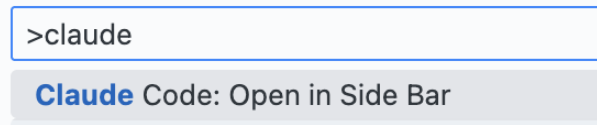
### 1. 侧边栏不显示
摁住`cmd+shift+p` 输入claude搜索,选择 `open in side bar`
 ### 无法使用第三方API
编辑(或者新增)`~/.claude/config.json`
```json theme={null}
{
"primaryApiKey": "default"
}
```
**修改配置后重启!!!**
## Codex
### 1. 登录问题:以一种访问权限不允许的方式做了一个访问套接字的尝试。 (os error 10013)
[点击访问原帖](https://linux.do/t/topic/926737)
1.使用管理员启动CMD
2.依次运行
`netsh int ipv4 set dynamicport tcp start=49152 num=16384`
`netsh int ipv6 set dynamicport tcp start=49152 num=16384`
3.重启电脑
### 2. 更新插件后导致历史的会话“丢失”
[点击访问原帖](https://linux.do/t/topic/961950)
安装回原版本或临近的版本,历史会话记录就会找到,但是新的插件版本中的会话同样会丢失
VS Code 的插件镜像网站: [https://vsc-extension.dreamsoul.cn/](https://vsc-extension.dreamsoul.cn/)
### 3. 不能直接选择思考级别
在 `config.toml` 配置中添加 `requires_openai_auth = true`
### 4. 模型 `gpt-5-codex` 文件编辑的方式 bug
在 `config.toml` 配置中添加 `requires_openai_auth = true`
### 5. CLI 切换模型相关问题
通过启动参数指定模型进入交互模式:
```bash theme={null}
codex -m gpt-5-codex
```
### 6. Codex模型写脚本改代码?
[点击访问原帖](https://linux.do/t/topic/988879)
> 原因:
>
> 猜测是codex模型就是基于gpt5模型的coding数据sft出来的模型,所以openai很自信的认为已经不需要提示它使用apply\_patch了,但结果很明显,codex模型根本不知道还有一个apply\_patch工具被hook在了shell工具之中,导致tool定义里没有apply\_patch的时候,是完全不知道可以使用apply\_patch的。
补上提示词:
```
# Text Editing Tools
When performing text editing, must use the `apply_patch` tool instead of running temporary scripts with Python commands to edit files (e.g `{"command":["apply_patch","*** Begin Patch\n*** Add File: test.txt\n+test\n*** End Patch\n"],"workdir":"","justification":"Create file test.txt"}`)
```
只需要添加上apply\_patch的调用例子,并且强调应该使用apply\_patch进行文件修改,应该就和gpt5模型行为对齐了。
### 无法使用第三方API
编辑(或者新增)`~/.claude/config.json`
```json theme={null}
{
"primaryApiKey": "default"
}
```
**修改配置后重启!!!**
## Codex
### 1. 登录问题:以一种访问权限不允许的方式做了一个访问套接字的尝试。 (os error 10013)
[点击访问原帖](https://linux.do/t/topic/926737)
1.使用管理员启动CMD
2.依次运行
`netsh int ipv4 set dynamicport tcp start=49152 num=16384`
`netsh int ipv6 set dynamicport tcp start=49152 num=16384`
3.重启电脑
### 2. 更新插件后导致历史的会话“丢失”
[点击访问原帖](https://linux.do/t/topic/961950)
安装回原版本或临近的版本,历史会话记录就会找到,但是新的插件版本中的会话同样会丢失
VS Code 的插件镜像网站: [https://vsc-extension.dreamsoul.cn/](https://vsc-extension.dreamsoul.cn/)
### 3. 不能直接选择思考级别
在 `config.toml` 配置中添加 `requires_openai_auth = true`
### 4. 模型 `gpt-5-codex` 文件编辑的方式 bug
在 `config.toml` 配置中添加 `requires_openai_auth = true`
### 5. CLI 切换模型相关问题
通过启动参数指定模型进入交互模式:
```bash theme={null}
codex -m gpt-5-codex
```
### 6. Codex模型写脚本改代码?
[点击访问原帖](https://linux.do/t/topic/988879)
> 原因:
>
> 猜测是codex模型就是基于gpt5模型的coding数据sft出来的模型,所以openai很自信的认为已经不需要提示它使用apply\_patch了,但结果很明显,codex模型根本不知道还有一个apply\_patch工具被hook在了shell工具之中,导致tool定义里没有apply\_patch的时候,是完全不知道可以使用apply\_patch的。
补上提示词:
```
# Text Editing Tools
When performing text editing, must use the `apply_patch` tool instead of running temporary scripts with Python commands to edit files (e.g `{"command":["apply_patch","*** Begin Patch\n*** Add File: test.txt\n+test\n*** End Patch\n"],"workdir":"","justification":"Create file test.txt"}`)
```
只需要添加上apply\_patch的调用例子,并且强调应该使用apply\_patch进行文件修改,应该就和gpt5模型行为对齐了。